

SHARE THIS POST
Recent Posts
FOLLOW IAASTEAM
IAASTEAM POST INFORMATION
UIT IT-Admin Fix Tool V1 – Comprehensive Android Repair, OTA Control & Screen Mirroring Suite
Unlock the full potential of IAASTeam’s UIT IT-Admin Fix Tool V1: Android 15 & 13/14 bypass, OG Play Store restore, granular OTA disable, live device mirroring, factory reset re-enable, QR-driven downloads, IP diagnostics, progress logs, video guidance, and more.
📱 What Is UIT IT-Admin Fix Tool V1?
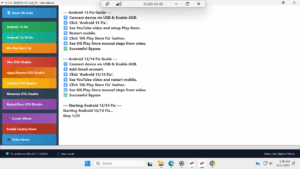
UIT IT-Admin Fix Tool standalone Windows utility streamlines every critical Android repair workflow into one polished interface. Technicians gain one-click access to advanced ADB scripts, real-time status logs, embedded video tutorials, QR-powered downloads, and network diagnostics—no extra downloads required.
🔑 Core Features & Functions
| Feature | Description |
|---|---|
| Show QR Code | Instantly generate & scan a QR code to download APKs or firmware without typing URLs. |
| Android 15 Fix | Auto-inject ADB commands, stream YouTube setup video, apply OG Play Store bypass, reboot device. |
| Android 13/14 Fix | One-click Gmail account add, embedded tutorial, OG Play Store manual steps, automated reboot sequence. |
| OG Play Store Fix | Legacy Google Play restore for all affected builds—manual fallback from video steps if needed. |
| OTA Disable Modules: | Granular toggles to prevent unwanted updates on: Vivo, Oppo/Realme, OnePlus, Motorola, Redmi/Poco. |
| Screen Mirror | Live device mirroring via QR code; view & control your Android screen on PC with zero latency. |
| Enable Factory Reset | Unlock disabled factory reset menus on locked, MDM-controlled, or restricted devices. |
| Video Guide | Embedded playlist of the latest IAASTeam walkthroughs—no external browser needed. |
| Network Diagnostics | Displays device IP, checks ADB connectivity health, logs timeout errors, and suggests USB-debug tips. |
| Progress & Logging Console | Step-by-step feedback (e.g. “Step 1/25”), success ✅ or failure ❌ icons, plus detailed error messages. |
| Standalone & Local-Only Mode | Runs without internet access beyond ADB; ideal for secure labs and offline repair stations. |
🚀 Quick Start: Android 13/14 Fix
Connect & Prep
Plug in via USB, enable USB Debugging & authorize PC.
Verify with adb devices in your terminal.
Launch & Grant Permissions
Click Android 13/14 Fix.
Tool auto-grants WRITE_SECURE_SETTINGS to streamline bypass.
Embedded Video Walk-Through
Follow on-screen YouTube steps directly inside the app.
Reboot when prompted; tool will auto-detect reboot and continue.
OG Play Store Bypass
Click OG Play Store Fix.
If manual steps needed, consult the pauseable video walkthrough.
Monitor Progress
Watch the Progress Console update in real time.
On failure (e.g. “ADB command timed out. The device may be unresponsive.”), reconnect USB, toggle debugging, then retry.
Pro Tip: Use a high-quality data cable and latest OEM USB drivers for rock-solid connectivity.
▶️ Integrated Video Guide
📥 Download & Support
QR-Powered Download:
Open the app → Show QR Code → Scan with any mobile device to grab the latest V1 installer or APK.
Community & Firmware:
Join our Telegram support group for direct firmware links, custom scripts, and peer troubleshooting.
Offline Lab Use:
Enable Standalone Mode to run entire suite without internet—logs saved locally for audit trails.
