

TMT Qualcomm Tool V1.0.2025 — Free & Activated (Full Feature List)
Overview
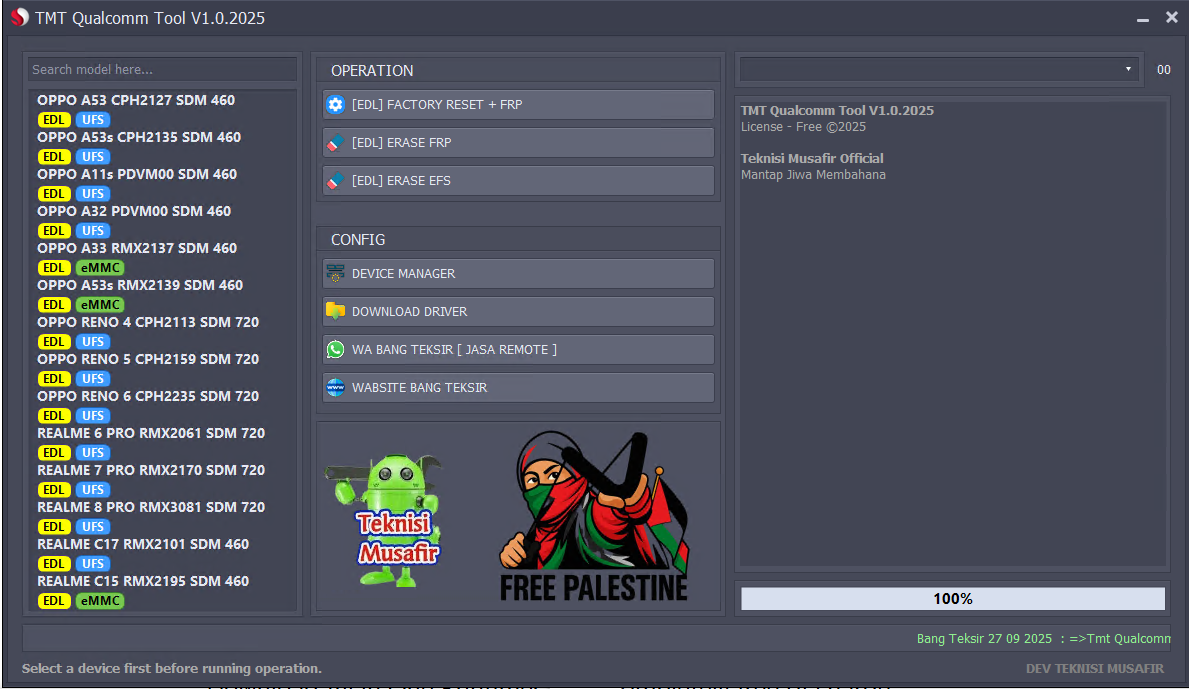
TMT Qualcomm Tool V1.0.2025 is a free, activated Windows utility focused on Qualcomm-based OPPO and realme devices. The UI is clean and direct: pick a model from the left panel, choose an EDL operation, and run. The tool surfaces storage type per model (UFS/eMMC), includes quick access to Device Manager and driver download, and shows live status and a completion bar.
Core Operations (EDL Mode)
• Factory Reset + FRP
• Erase FRP
• Erase EFS
Config Shortcuts
• Device Manager (open Windows Device Manager)
• Download Driver (Qualcomm/ADB drivers)
• Contact/Support shortcut
• Website shortcut
Supported Models (as shown, with storage type)
OPPO (Qualcomm)
• A53 CPH2127 — SDM460 — EDL UFS
• A53s CPH2135 — SDM460 — EDL UFS
• A11s PDVM00 — SDM460 — EDL UFS
• A32 PDVM00 — SDM460 — EDL UFS
• A33 RMX2137 — SDM460 — EDL eMMC
• A53s RMX2139 — SDM460 — EDL eMMC
• Reno 4 CPH2113 — SDM720 — EDL UFS
• Reno 5 CPH2159 — SDM720 — EDL UFS
• Reno 6 CPH2235 — SDM720 — EDL UFS
realme (Qualcomm)
• 6 Pro RMX2061 — SDM720 — EDL UFS
• 7 Pro RMX2170 — SDM720 — EDL UFS
• 8 Pro RMX3081 — SDM720 — EDL UFS
• C17 RMX2101 — SDM460 — EDL UFS
• C15 RMX2195 — SDM460 — EDL eMMC
How to Use (High-Level)Install Qualcomm and ADB drivers on the PC.
Put the target phone into EDL (Qualcomm Emergency Download) mode.
Launch TMT Qualcomm Tool V1.0.2025.
Select the exact model from the left list (confirm storage type matches the device).
Choose one of the EDL operations: Factory Reset + FRP, Erase FRP, or Erase EFS.
Run the task and monitor progress in the status panel until 100%.
Notes & Good Practice for all MRST Technicians
• Always verify the model and storage type (UFS/eMMC) before running an operation.
• Back up important data where possible; Factory Reset and EFS actions are destructive.
• Use only on devices you own or are authorized to service and comply with local laws and OEM policies.
• If the device is not detected in EDL, recheck drivers, cable, and port.
