

SPFlash V5 Multi Flasher – Auto-Convert Global ROM For Redmi 14C (lake/pond)
Supports OS1.0.5.0 → OS2.* | No Mi-Auth Login • No Bootloader Unlock
OVERVIEW
This preset for SPFlash V5 Multi Flasher lets authorized technicians flash an official Global ROM to Redmi 14C variants (codenames lake/pond) and auto-convert the package for direct write via SP Flash Tool. HyperOS 2 (OS2.*) Global builds for Redmi 14C are publicly listed and downloadable; always match the codename before flashing. (mifirm.net, Xiaomi)
WHAT YOU NEED
• Windows PC, USB cable, MediaTek drivers + SP Flash Tool (v5.x). (spflashtool.com)
• The correct Global ROM for Redmi 14C (lake) or its sibling (pond) from a trusted mirror (example Global build: OS2.0.4.0.VGTMIXM). Confirm code with fastboot getvar product. (mifirm.net)
• Battery ≥50% and a full user backup (flashing wipes data).
SUPPORTED
• Redmi 14C / POCO C75 / A3 Pro family (codename lake) and related pond board family. Verify with a codename index or the device wiki/specs before proceeding. (XiaomiROM, wiki.postmarketos.org)
ONE-PAGE WORKFLOW
Download Global ROM: Grab the official Global package for lake (or region build like EEA for lake_eea). Example: OS2.0.1.0 / OS2.0.4.0 Global, Android 15. (mifirm.net)
Load In SPFlash V5:
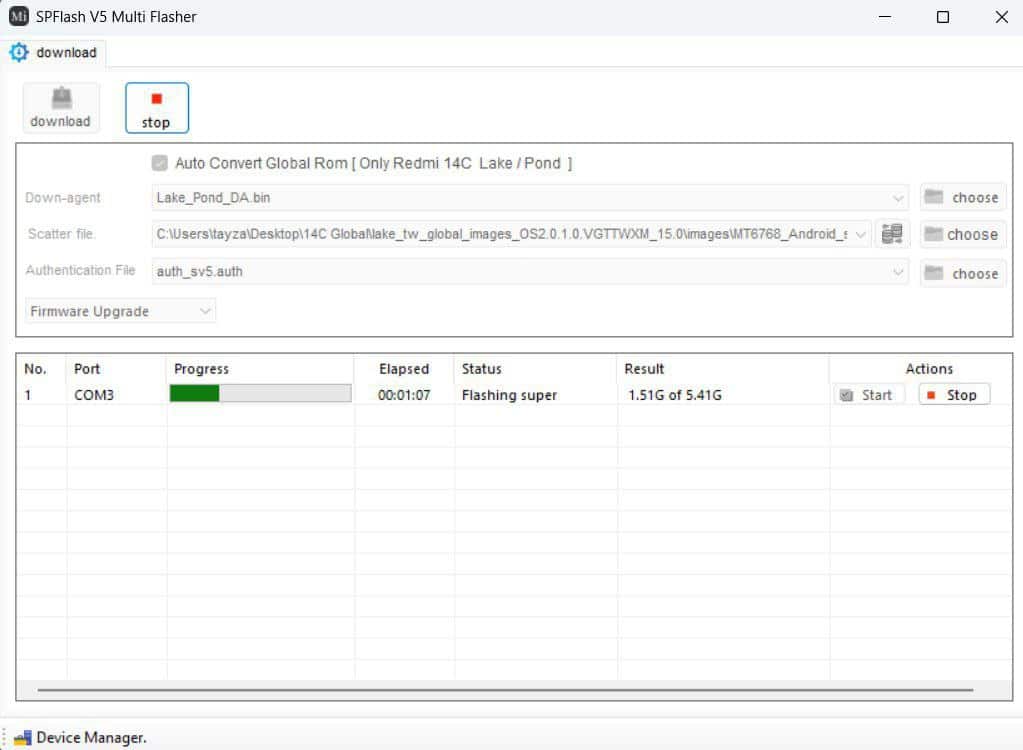
– Select the provided Download Agent (DA) for lake/pond.
– Choose the ROM’s scatter file.
– (If your environment requires an auth file, select the included SV5 auth; no Mi-Auth login is needed.)
Tick “Auto Convert Global ROM (Only Redmi 14C Lake/Pond)” to let the flasher prep partitions automatically.
Mode: Leave action as Firmware Upgrade (recommended for partition layout changes).
Click Download/Start and wait for super and other partitions to complete; the progress and bytes written will be shown.
Reboot & Verify: First boot can take time. After setup, confirm build string (e.g., OS2.0.x Global), baseband, Wi-Fi/Bluetooth, and camera.
NOTES & TIPS
• Why OS2.*? Redmi 14C Global HyperOS 2 firmware (e.g., OS2.0.x MIXM/EUXM) is available and based on Android 15 for recent builds. (mifirm.net, Xiaomi)
• Codename matters: Flashing a mismatched region/codename can brick the device—always confirm lake / lake_eea (or pond family) before flashing. (mifirm.net)
• SP Flash Tool basics: SPFT is the standard ROM writer for MTK devices—load scatter, use the proper DA, and keep a stable USB connection. (spflashtool.com)
FAQ (SHORT)
Q: Do I need to unlock the bootloader?
A: Not for this preset; it’s designed to work without BL unlock on supported lake/pond targets, using the correct DA/auth pairing.
Q: Where do I find valid Global ROMs?
A: Use recognized mirrors listing lake Global/EEA HyperOS 2 builds (examples: OS2.0.1.0.VGTMIXM, OS2.0.4.0.VGTMIXM, OS2.0.202.0.VGTEUXM). (mifirm.net)
Q: What if I only see “China” ROM?
A: Do not flash China ROMs to a Global device unless you understand the implications. Prefer the exact region package that matches your device. (mifirm.net)
ESSENTIAL LINKS (COPY/PASTE)
• Redmi 14C / POCO C75 / A3 Pro (lake) Global downloads (sample): OS2.0.x MIXM/EUXM. (mifirm.net)
• Codename directory for lake: full model list and regions. (mifirm.net)
• Device references: Redmi 14C “xiaomi-lake” wiki; PhoneDB “Xiaomi Lake/Pond”. (wiki.postmarketos.org, PhoneDB)
• SP Flash Tool info/download. (spflashtool.com)
COMPLIANCE / RISK NOTICE
Flashing modifies system partitions and may void warranty. Use only on devices you own or are authorized to service, and always keep customer consent and backups. Wrong packages/codenames can permanently brick devices. HyperOS 2 feature availability varies by build and market. (Xiaomi)
