GSM Future Tool V2.1 — Free Download (No Login Needed)
Overview
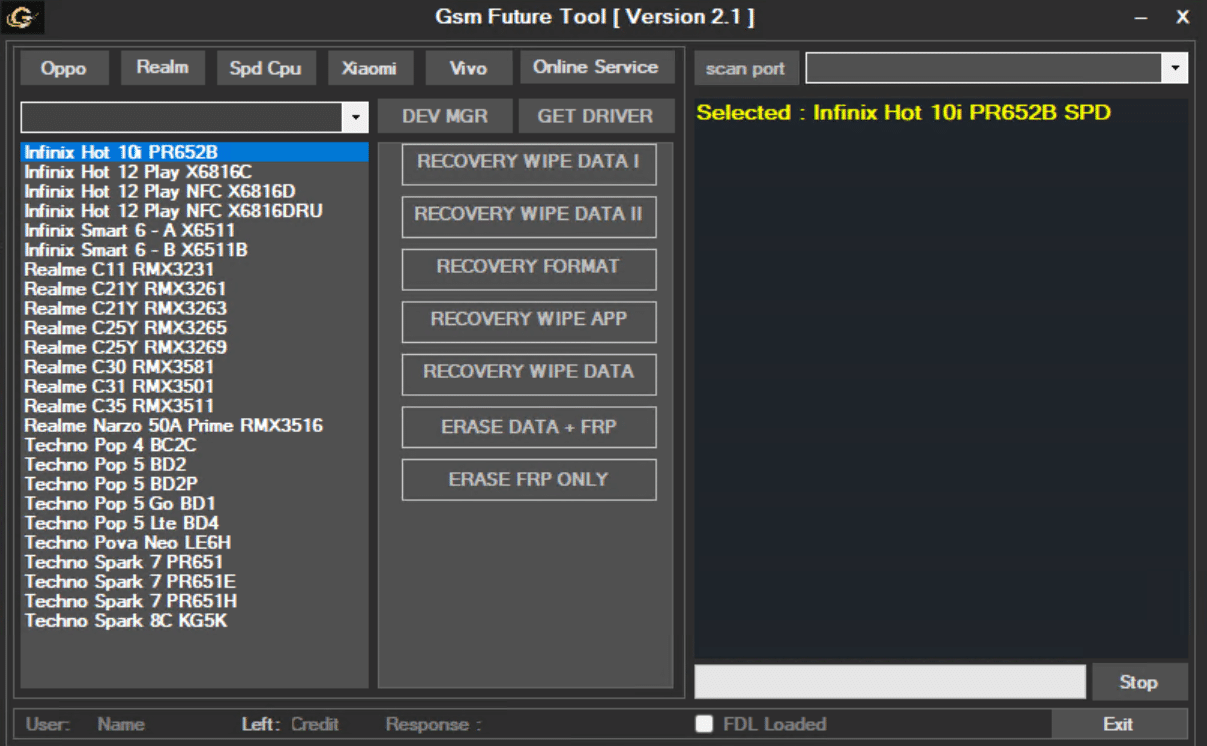
GSM Future Tool V2.1 is a lightweight Windows utility focused on day-to-day service tasks for Spreadtrum/Unisoc (SPD) Android devices, with an emphasis on OPPO and realme. This release is distributed free and operates without a login prompt. While the feature set currently prioritizes SPD targets, the interface also lists Xiaomi and Vivo sections, suggesting broader coverage may arrive in future updates.
Scope and Positioning
• Primary focus: OPPO and realme phones built on SPD chipsets.
• Secondary/Upcoming: Xiaomi and Vivo entries are present in the UI but may be limited or in early testing.
• Best for: Shops handling FRP, basic resets, and quick recoveries on budget and mid-tier SPD devices.
Supported Brands / Chipsets
• OPPO (SPD)
• realme (SPD)
• Spreadtrum/Unisoc platforms in general
• Xiaomi and Vivo (listed; treat as limited/beta until confirmed)
Core Features
Account/Lock and Reset
• Erase FRP: Remove Google Factory Reset Protection on supported SPD devices.
• Factory Reset: Restore the device to factory defaults.
• Erase Data + FRP: Combined workflow for full wipe plus FRP removal (when a clean start is required).
• Erase FRP Only: Single-purpose action for faster turnaround on lock-only jobs.
Brand-Specific Helpers
• Reset | Disable Mi Cloud (Xiaomi): Toolkit entry for devices that expose the relevant handler (availability may vary by model/OS).
• Unlock Bootloader: BL unlock entry for supported models (verify model/patch requirements and owner authorization).
Recovery-Mode Operations
• Recovery Wipe Data I / II
• Recovery Format
• Recovery Wipe App
• Recovery Wipe Data (generic)
(Use these when ADB is unavailable but recovery menu hooks are present.)
Technician Utilities
• Scan Port: Auto-detect the active device interface.
• DEV MGR: One-click launch of Windows Device Manager for driver checks.
• GET DRIVER: Shortcut to locate/install the required USB drivers.
• Stop / Exit: Controlled termination to prevent half-finished jobs.
Requirements
• Windows PC, quality USB cable.
• SPD/Unisoc and ADB drivers.
• Sufficient battery charge on the handset.
Recommended Shop Workflow (High Level)
Intake and consent: verify ownership/authorization; record IMEI/SN, OS version, security patch.
Drivers and detection: install SPD/ADB drivers; connect the phone; run Scan Port and confirm enumeration.
Choose the minimal remedy: prefer “Erase FRP Only” for lock-only jobs; use “Erase Data + FRP” or “Factory Reset” when a full wipe is appropriate.
Brand helpers: if working on Xiaomi with exposed hooks, try “Reset | Disable Mi Cloud” (only with owner’s consent and in compliance with local law).
Post-checks: confirm boot, lock status, SIM/network service, and basic functions (Wi-Fi, BT, camera).
Documentation: save logs/screenshots to the job ticket.
Notes, Limits, and Good Practice
• Feature availability is model/OS/patch dependent; not all menus will act on every device.
• Xiaomi/Vivo sections may be partial; verify on test devices before customer work.
• FRP, MDM, and account features must be used only with the device owner’s informed consent and in accordance with local laws and OEM policies.
• Always back up user data and EFS/NVRAM when possible prior to destructive actions.