

CPT PRO Tool Download: Get the Latest Version V1.1.9 (Free CPID & IMEI Repair)
Tired of paying for slow, outdated IMEI and CPID repair utilities? CPT Tool changes the game with lightning-fast fixes, zero licence fees and one-click updates. The brand-new CPT Tool v1.1.9 lands with automated device detection, MTK ETS port functions and a cleaner GUI—putting professional-grade diagnostics in the hands of every technician. Whether you handle Qualcomm, Mediatek or Xiaomi handsets, this all-in-one utility slices repair time from minutes to seconds.
Why CP Tool Matters
- Instant IMEI & CPID repair – restore identifiers in as little as 20 seconds.
- 100 % free licence – every feature unlocked at install; five welcome credits included.
- Broad chipset reach – Qualcomm, IMEI repair for Mediatek and more.
- Zero ADB dependency – v1.0.9 removed legacy ADB checks for a cleaner workflow.
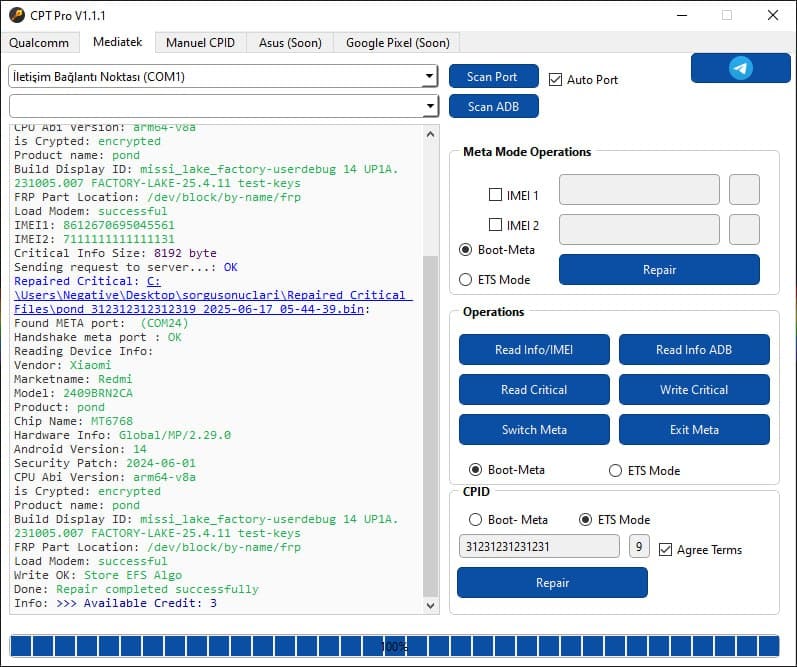
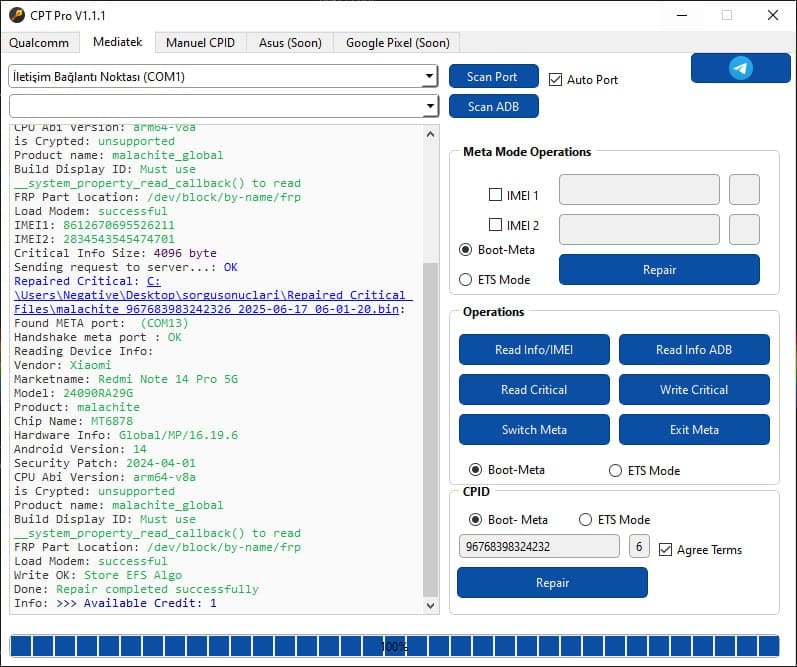
- Real-world proof – Redmi 14C Lake and Redmi Note 14 Pro 5G fixed permanently in recent tests.
Looking for additional Android-repair utilities? Explore our Android Repair Tools hub for dozens of one-click solutions.
CP Tool Version History (v1.0.0 → v1.1.9)
🔥CP Tool V1.1.6 Released !😉
🔥Added Exynos Usb Bulk (EUB Mode) Dead Boot Repair Support !🔥
🥰No credit / No paid. All is free !!!😉
⭐️You can repair devices with CP Tool in the listed models / that have crashed or hard bricked.
Supported Models:
Samsung Galaxy S20 (SM‑G980F)
Samsung Galaxy S20+ (SM‑G985F)
Samsung Galaxy S20+ (SM‑G985F/DS)
Samsung Galaxy S20 Ultra (SM‑G988F)
Samsung Galaxy S20 Ultra (SM‑G988B/DS)
Samsung Galaxy S20 FE (SM‑G780F)
Samsung Galaxy S20 FE (SM‑G780F/DS)
Samsung Galaxy Note 20 (SM‑N980F)
Samsung Galaxy Note 20 (SM‑N981F)
Samsung Galaxy Note 20 Ultra (SM‑N985F)
Samsung Galaxy Note 20 Ultra (SM‑N986F)
Samsung Galaxy Tab S6 Lite (SM-P610)
Samsung Galaxy Note 10 (SM‑N970F)
Samsung Galaxy Note 10 (SM‑N970F/DS)
Samsung Galaxy Note 10+ (SM‑N975F)
Samsung Galaxy Note 10+ (SM‑N975F/DS)
Samsung Galaxy Note 10+ 5G (SM‑N976B)
Samsung Galaxy F62 (SM‑E625F)
Samsung Galaxy M62 (SM‑M625F)
Samsung Galaxy A51 (SM‑A515F)
Samsung Galaxy A51 (SM‑A515F/DS)
Samsung Galaxy A51 (SM‑A515F/DSM)
Samsung Galaxy A51 (SM‑A515F/DSN)
Samsung Galaxy A51 (SM‑A515F/DST)
Samsung Galaxy A50 (SM‑A505F)
Samsung Galaxy A50 (SM‑A505FN)
Samsung Galaxy A50 (SM‑A505G)
Samsung Galaxy A50 (SM‑A505U)
Samsung Galaxy A50 (SM‑A505W)
Samsung Galaxy A40
Samsung Galaxy A41
Samsung Galaxy M30s
Samsung Galaxy A60
Samsung Galaxy A70
Samsung Galaxy A80
Samsung Galaxy A7 (2018) (SM‑A750F)
Samsung Galaxy A7 (2018) (SM‑A750FN)
Samsung Galaxy A7 (2018) (SM‑A750F/DS)
Samsung Galaxy A8 (2018) (SM‑A530F)
Samsung Galaxy A8 (2018) (SM‑A530F/DS)
Samsung Galaxy A8+ (2018) (SM‑A730F)
Samsung Galaxy A8+ (2018) (SM‑A730F/DS)
Samsung Galaxy J7 Duo (2018) (SM‑J720F)
Samsung Galaxy J7 Duo (2018) (SM‑J720F/DS)
Samsung Galaxy XCover 4s (SM‑G398FD)
Samsung Galaxy M10s (SM‑M107F)
and more and more…
| Version | Release Date | Highlights | Download |
|---|---|---|---|
| v1.0.0 | 29 May 2025 | Initial public launch • Free CPID for all users | Direct link |
| v1.0.5 | 3 Jun 2025 | Unlocked every function—no paywall | Direct link |
| v1.0.7 | 12 Jun 2025 | Improved manual CPID workflow | Direct link |
| v1.0.8 | 15 Jun 2025 | Added full Mediatek chipset support | Direct link |
| v1.0.9 | 16 Jun 2025 | Auto product detection • Removed ADB stage • Validation & logging overhaul | Direct link |
| v1.1.0 | 16 Jun 2025 | Performance optimisation • Critical bug fixes | Direct link |
| v1.1.1 | 17 Jun 2025 | MTK ETS port functions • GUI polish • Extra optimisations | Latest |
How to Install & Register CP Tool (Step-by-Step)
- Download CP Tool v1.1.1 from the table above.
- Extract the ZIP to a trusted drive.
- Run
CPT.exeas Administrator. - Click Register and verify your email—five free credits unlock instantly.
- Connect your device in EDL, Fastboot or MTK Pre-Loader mode.
- Select Repair → IMEI/CPID and press Start.
Top 5 New Features in CPT Tool v1.1.1
- MTK ETS Port Integration – deeper Mediatek access.
- Cleaner GUI – streamlined panels & field auto-reset.
- Faster core – improved memory allocation.
- Extended logs – colour-coded error reporting.
- Still 100 % free – no licences, no subscriptions.
Supported Devices & Chipsets
- Mediatek – Helio G, Dimensity, budget MTK 4G.
- Qualcomm – Snapdragon 4/6/7/8.
- Proven Xiaomi fixes – Redmi 14C Lake, Redmi Note 14 Pro 5G.
Frequently Asked Questions
Is CP Tool really free?
Yes—every function remains cost-free, plus five welcome credits on signup.
How to register CP Tool?
Open the app, click Register, enter your email, confirm the link and you’re set.
Does CP Tool support Mediatek chipsets?
Absolutely. MTK support arrived in v1.0.8 and expanded in v1.1.1.
{ “@context”:”https://schema.org”, “@type”:”FAQPage”, “mainEntity”:[ {“@type”:”Question”,”name”:”Is CP Tool really free?”,”acceptedAnswer”:{“@type”:”Answer”,”text”:”Yes. Every core feature—from CPID write to IMEI repair—is 100 % free.”}}, {“@type”:”Question”,”name”:”How to register CP Tool?”,”acceptedAnswer”:{“@type”:”Answer”,”text”:”Launch CP Tool, click Register, add a valid email and confirm the activation link.”}}, {“@type”:”Question”,”name”:”Does CP Tool support Mediatek chipsets?”,”acceptedAnswer”:{“@type”:”Answer”,”text”:”Yes. Full Mediatek support was introduced in v1.0.8 and enhanced with MTK ETS functions in v1.1.1.”}} ] }
Final Thoughts – Download CPT Tool v1.1.1 Now
Stop losing time on paid licences or trial-locked tools. CP Tool delivers pro-level repairs, zero cost and updates that keep getting faster. Click below and experience the quickest CP Tool download yet.
Download CPT Tool v1.1.1 –Click the OnSite Download Button
