

SHARE THIS POST
Recent Posts
FOLLOW IAASTEAM
IAASTEAM POST INFORMATION
CDMA YEMEN TOOL PRO v0.3.3 — Free Login Edition (Working 100%)
Overview
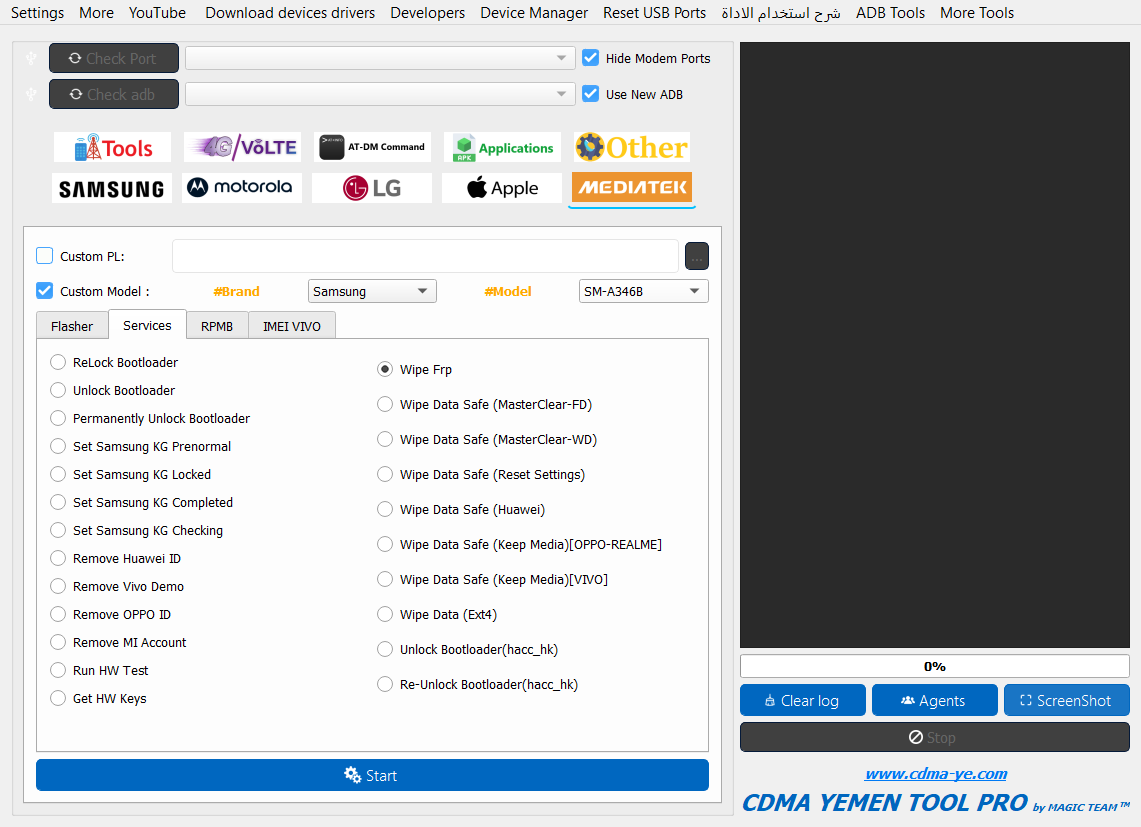
CDMA Yemen Tool PRO v0.3.3 is a 2024 desktop suite for professional mobile technicians. It consolidates port/driver checks, ADB and Fastboot utilities, CDMA conversions, LTE band and carrier-policy editing, FRP and MDM handling (authorized use only), language/app management, IMEI repair for eligible workflows, and broad Samsung, LG, Motorola, and MTK service actions. The current build is under active testing; some server-backed modules (notably parts of the MTK section and the entire 4G tab that relies on online model catalogs) are temporarily unavailable. All other local features have been validated by community testers and are functioning as expected.
Important compliance note
Use this software only on devices you own or are explicitly authorized to service. Do not attempt to bypass licensing, paid services, or cloud/MDM protections without proper permission. IMEI-related features must be used solely to restore a device’s original identifiers where permitted by law.
Core capabilities
I) General & Utility
• Connection diagnostics: Check Port, Check ADB, Device Manager launcher, driver downloader, USB port reset
• Session control: Clear log, agent selection, quick screenshots for job tickets
II) General Tools (Conversions, Network, Locks)
• CDMA conversions: Generic, LG (Android 7–11), Samsung CDMA profiles
• Network fixes: 3G EVDO, multi-method baseband repair, China-specific no-SIM and LT/CT carriers, Motorola EVDO paths
• Policy/lock actions: Unlock China Telecom, remove Policyman (where allowed)
III) 4G/LTE Tools
• By Model (server-backed): brand selector, model search, per-model 4G presets, Zero SPC, enable LTE band, carrier_policy.xml editor
• One-Click sets: Samsung China Telecom, Redmi QCOM, OnePlus (single/dual SIM), Motorola, Vivo, China Mobile, Exynos/MTK variants, post-SIM-swap 4G restore, repair fake 4G
• Carrier Policy tools: select/write/save carrier_policy.xml, open policy editor
• Band control: quick toggles for common bands (3/7/20/28), enable/disable all
IV) Other Tools
• ADB: reboots (Normal, Redmi/POCO/Xiaomi, Verizon), enable Diag, app remove, FRP reset, Knox/MDM touches, unlocks for Sprint LG, fix bootloop, open network modes, Huawei CDMA method, show mobile data icon, enable unknown sources, hands-free activation fix, LG CDMA mode, language installer (ar-YE, en-US)
• Ports: 3G force mode without SPC, SIM edit, PRL updates (1x→3G), enable 3G on Samsung Exynos, LG kill switch, show/open hidden menus, SIM unlock, Diag toggles for Samsung Verizon
• IMEI (authorized contexts): LG-method write mode, IMEI/MEID/ESN fields
V) Samsung Tools
• CSC switching: VZW, USC, ATT, GCF, SPR, TMB, XAA, and others; standard and fast modes (Android 10–13); CSC with SIM; enable/disable convert with SIM
• FRP/MDM: one-click FRP bypass (Android 5–13), reset FRP new security and normal mode, Samsung account/MDM assist, FRP via ADB, hidden-menu unlock
• Arabic language packs: add Arabic on Android 9–13 (including 12–13 quick add), and removal utilities
VI) Motorola Tools
• ADB: language installer
• Fastboot: generic Fastboot panel, bootloader unlock, Diag without root/unlock (where supported), set Diag ON, boot TWRP, install Magisk through recovery/adb, obtain bootloader code
• Ports: EVDO workflows, Zero SPC
VII) LG Tools
• ADB: reboot to bootloader, Magisk app install, Diag (root), APN editor, language installers
• Fastboot: network fix after convert, Sprint unlock, APN
• Port ops: open modem port, skip lock screen, open hidden menu, reboot to Download Mode, Zero SPC, convert to CDMA, wipe data via multiple port/mode routes
VIII) APK Tools
• App manager: install APK, list packages, disable/enable, uninstall/force uninstall, reinstall, fetch activity and package names
IX) AT-DM Tools
• AT interface: load/save command files, send commands to selected port, speed/sleep tuning, port settings, hide modem ports
X) MTK (MediaTek) Tools
• Flasher: read PMT and full system info, generic read/write/format/erase, memory and part readers, sensitive-data backup
• Services: relock/unlock bootloader (including permanent unlock paths), Samsung KG state set (prenormal/locked/completed/checking), remove OEM locks or demo modes (Huawei ID, Vivo Demo, OPPO ID, Mi Account), hardware test and key retrieval, FRP wipe, safe wipes (MasterClear variants, vendor-specific “keep media” options)
• RPMB: read/write/erase with custom-area input
• IMEI (Vivo): read/write IMEI1/IMEI2, create/restore IMEI backups
