

APIZU Tool V4.3.0 PRO — Free Login (Community Build) — In-Depth Overview
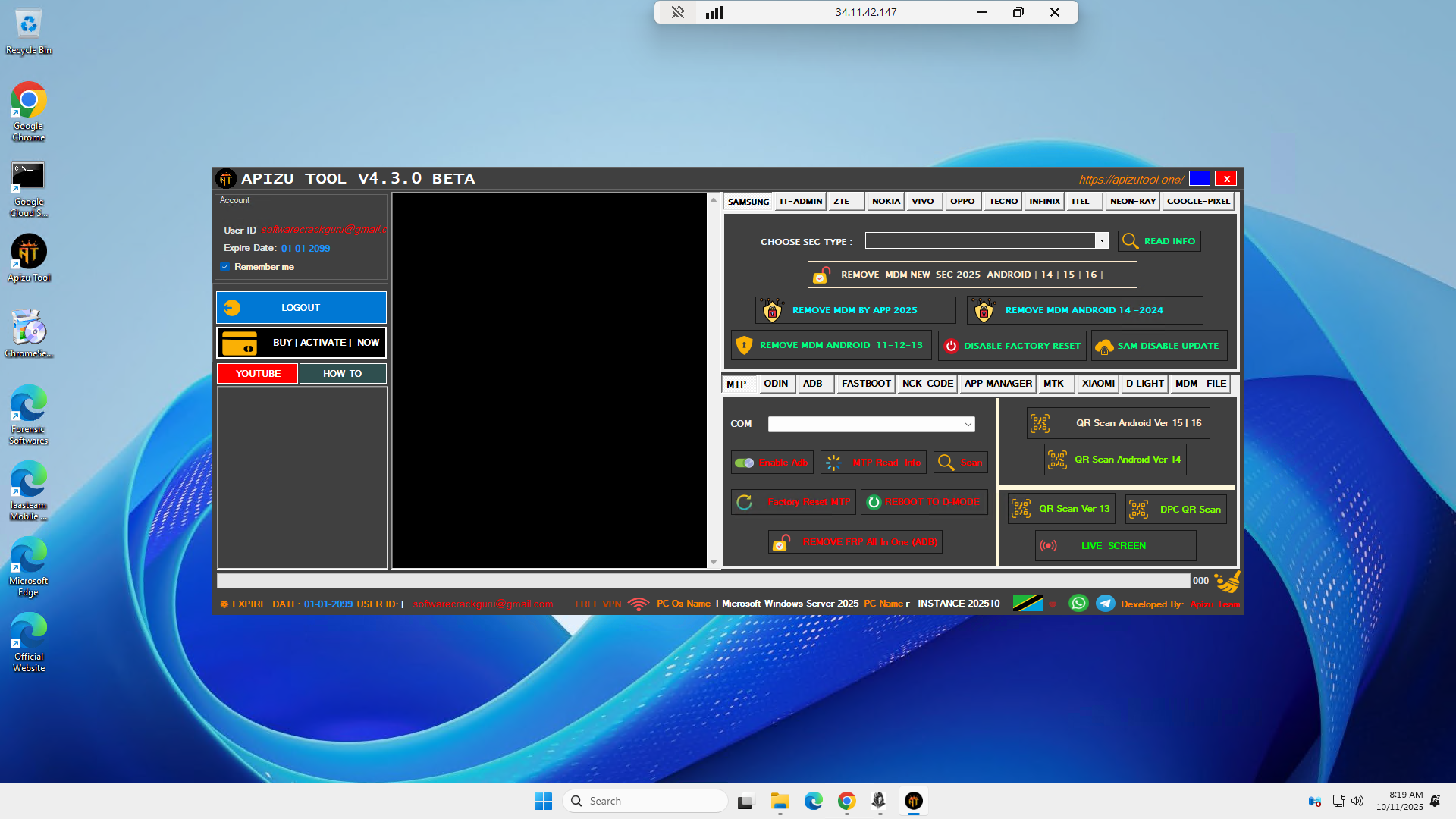
Overview
APIZU Tool has grown into a broad, technician-oriented suite that centralizes MDM unlock workflows, FRP utilities, ADB/Fastboot controls, MTK/Odin helpers, region/network unlock options, and brand-specific panels for Samsung, Google Pixel, ZTE, Nokia, Tecno, Infinix, Itel, Vivo, Oppo, Xiaomi, and more. The 4.3.0 line focuses on smoother logins, wider Android 14–16 coverage for MDM-style patches, new SEC models, and stability/malware cleanups reported for prior builds. This post summarizes the feature surface as presented for the 4.3.0 beta/pro release.
Important compliance note
• Use only on devices you own or are explicitly authorized to service.
• MDM/IT-Admin, FRP, and account-related features are for legitimate after-sales service with owner/enterprise permission.
• Respect regional laws and OEM terms. Do not attempt to bypass security or licensing without authorization.
What’s new in V4.3.0 (highlights)
• MDM patch coverage expanded for Android 14, 15, and 16.
• Faster login handling after PC/environment changes.
• Stability hardening and malware/false-positive cleanups.
• New Samsung SEC models supported (e.g., A05, A15, A55 families reported).
• Black-screen lock fixes improved for TECNO, INFINIX, ITEL.
• Fresh MDM unlock paths for SPD and MTK devices; relock-fix refinements.
Major feature groups
Samsung tab
• Remove MDM by app (2025 flow).
• Remove MDM Android 14 (2024 flow) and Android 11–13 legacy.
• QR Scan enablement (versions 13 and 14).
• Disable Factory Reset, Fix KG relock.
Samsung extra
• Enable ADB / Reset MTP, Scan Port, Read MTP Info.
• FRP via ADB, FRP for Exynos, FRP for Qualcomm.
• QR DPC Scan, Disable Samsung Update, Live Screen preview.
IT ADMIN tab
• Read device information.
• Remove IT Admin (universal and Android 15 flows).
• Disable Factory Reset, Stop/abort process.
• Broad brand mentions: Tecno, Infinix, Itel, Nokia (all models), Oppo (all models), Google Pixel (all models), plus listed special-case devices.
ZTE tab
• Choose model and read info.
• Remove MDM.
• RPMB download/handling shortcuts (A34–A54, A75 families).
• Disable Factory Reset, Stop.
Nokia tab
• Choose model, read info.
• Remove MDM.
• Disable Factory Reset, Stop.
Vivo tab
• Read info.
• Remove MDM.
• Disable Factory Reset.
• Disable OTA update.
Oppo tab (shared with Vivo)
• Read info, Remove MDM.
• Disable Factory Reset, Disable OTA.
Tecno / Infinix tabs (identical structure)
• Choose model and read info.
• Remove MDM, Remove Country Lock.
• Fix relock after MDM.
• Fix SMS/Call/Navigation issues.
• Delete/Uninstall security plugin.
• Remove FRP, Disable Factory Reset, Disable Update.
Neon-RAY tab
• Choose model and read info.
• Remove MDM, Stop.
Google Pixel tab
• Choose model and read info.
• Unlock network for Android 11–13 and Android 14–15.
• Disable Factory Reset.
NCK Codes tab
• Calculate NCK code by brand/model/IMEI.
ODIN tab
• COM port selection, Scan port, Read info.
• Reboot D-Mode→Normal and Normal→D-Mode.
• Factory Reset execution.App Manager tab
• Install/activate/delete Test DPC, Shizuku, Disabler, Alliance.
MTK (MediaTek) tab
• FRP MTK / FRP Samsung / FRP New.
• Wipe Data + FRP, Format Data.
• Mi Account helpers.
• Bypass BROM, Unlock/Relock Bootloader, Auth Bypass.
• Reset NV, Screen Lock methods [1]/[2].
• Demo removal (Vivo/Oppo/Realme).
ADB tab
• Reboot Recovery, Reboot, Power Off, Reboot D-Mode, Reboot Fastboot.
• FRP Reset options (-1 / -2 / -3).
• Package list/upload helpers, ADB kill-server.
Fastboot tab
• Reboot Normal/Recovery/Bootloader.
• Reset Userdata.
• Unlock BL [New], Relock BL.
Xiaomi tab
• Read info.
• Disable Mi Account (authorized contexts).
• Disable Factory Reset.
• Disable MI OTA update.
Delight tab
• Model selector (e.g., Delight M300).
• Read info, Remove MDM, Disable Factory Reset.
MDM Files tab
• Centralized file buckets for Samsung, Tecno, Infinix, Itel, Nokia, and all-in-one solutions.
Operational guidance (lawful, high level)Intake and consent: verify device ownership or enterprise authorization; record IMEI/serial, OS, patch level.
Baseline checks: read device info, note lock state (FRP/MDM/KG), confirm which tab/method applies to that OS range.
Execute minimal remedy: prefer reversible steps; keep full logs and screenshots for the ticket.
Post-checks: confirm lock states, network behavior, OTA toggles, and user experience.
Documentation: attach logs, steps performed, and outcome summary.
Requirements and notes
• Windows PC with updated drivers; quality USB cable.
• Some flows rely on brand-specific prerequisites (e.g., QR enable sequences, D-Mode).
• Feature availability can vary by model, SoC, region, and security patch.
• When using credit-based or licensed functions, ensure legitimate access; avoid unauthorized loaders or bypasses.
Risk and best practices
• Always back up critical data before resets or FRP operations where possible.
• Do not write or modify identifiers to foreign values; restore only the device’s own.
• MDM/enterprise devices: obtain written permission and follow organizational policy.
• Use correct firmware/region components; mismatches may brick the device.
Closing
APIZU Tool V4.3.0 PRO consolidates day-to-day Android service work into a single console with refreshed Android 14–16 coverage and expanded brand tabs. For professional shops, the breadth of MDM/FRP utilities, ADB/Fastboot controls, MTK helper functions, and ODIN tools can reduce turnaround time—provided you operate within legal and OEM boundaries and keep thorough records of each job.
